

Take a Quiz
Answer online and get your score as soon as you hand in — no waiting for it to be marked.
- Your answers are saved as you go
- A clock shows how long is left
- Your score, and which answers were right, come back straight away
How to Start
Section titled “How to Start”- Click Learning in the menu, then click your class.
- Open the Assignments tab and click the quiz assignment.
- Read the instructions, then click Start quiz.
The quiz takes over the screen so nothing else is in the way.
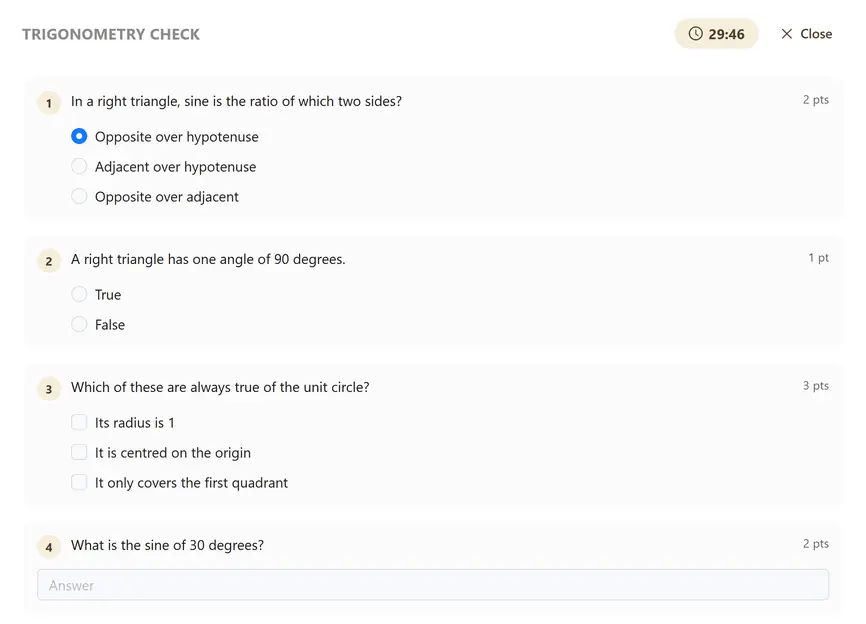
While You Are Answering
Section titled “While You Are Answering”- Pick one option for a true / false or single choice question, tick as many as apply for multiple choice, and type the number for a numeric one.
- Every question shows what it is worth.
- The clock at the top right counts down when the quiz is timed. It turns red in the last minute.
- Answers are saved as you go — you do not need to save anything.
If you need to step away, click Close. Your answers are kept, and the assignment shows Resume quiz when you come back. The clock keeps running.
How to Hand In
Section titled “How to Hand In”Click Submit at the bottom of the paper.
If the clock runs out first, the quiz hands itself in with the answers you have given.
How to See Your Score
Section titled “How to See Your Score”Your result appears on the assignment page as soon as you submit, with the marked paper: your score, the questions, the answer you gave, and the correct one.
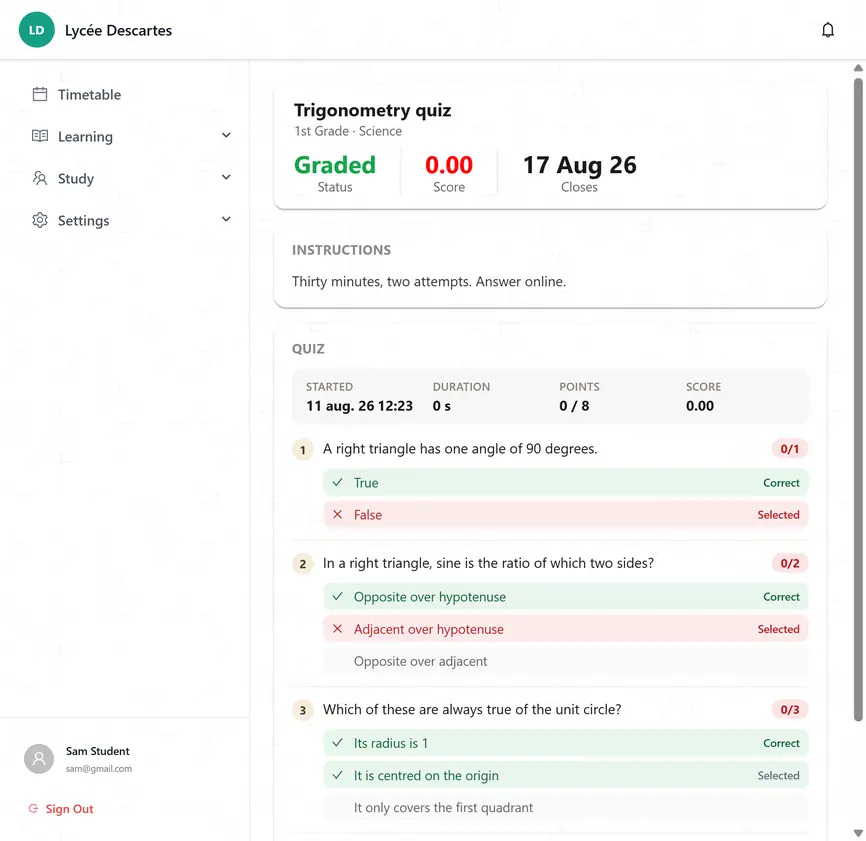
- A green row is the correct answer
- A red row is one you picked that was wrong
- The number beside each question is what you scored on it
What to Do If…
Section titled “What to Do If…”Start quiz says “This quiz is not open right now”
The quiz has closed. Check the Closes date at the top of the page.
You have already taken it and want another go
You get one sitting per quiz. Ask your teacher — they can post a new quiz as a new assignment.
The page reloads mid-quiz
Your answers are already saved. Open the assignment again and click Resume quiz.
💡 Answer everything, even if you are unsure — there is no penalty for a wrong answer, only points for a right one.
💡 For a numeric answer, only the number matters. 0.5, .5 and 0,5 are
all read the same way.