

Hand In an Assignment
Write your answer, attach your work, and hand it in — from a phone, a tablet or a computer.
- Save as you go and come back to it later
- Attach photos of your working, or a document
- Your grade and your teacher’s comments come back in the same place
How to Find Your Work
Section titled “How to Find Your Work”- Click Learning in the menu on the left.
- Click your class.
- Open the Assignments tab. Each one shows its status and, once it is marked, your grade.
- Click the assignment to open it.
How to Hand It In
Section titled “How to Hand It In”The instructions are on the left. Your workspace, the Work card, is on the right.
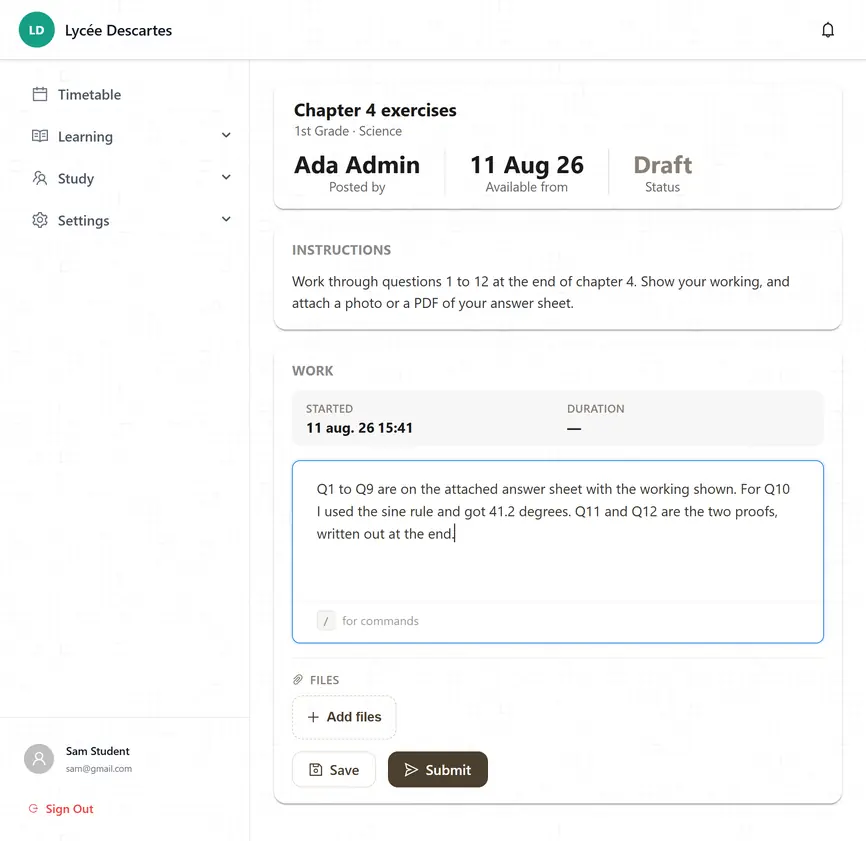
- Type your answer in the Work box.
- Click Add files under Files to attach photos or documents.
- Click Save whenever you want to stop and come back — nobody sees a saved draft but you.
- Click Submit when you are finished.
Once you submit, your teacher is told there is something to read, and you can no longer change the work unless your teacher returns it.
What the Status Means
Section titled “What the Status Means”| Status | What it means |
|---|---|
| To do | Not started. |
| Draft | You have started. Only you can see it. |
| Missing | The deadline has passed and nothing was handed in. |
| Submitted | Handed in and waiting to be marked. |
| Returned | Your teacher sent it back for another attempt. You can revise it and hand it in again. |
| Graded | Your grade is final and is in your report. |
Once your work is graded, your Score and your teacher’s feedback appear at the top of the Work card.
How to Redo Returned Work
Section titled “How to Redo Returned Work”If your teacher returns your work, the form opens again:
- Change your answer, or attach the corrected file.
- Click Resubmit.
You can resubmit until the deadline passes.
What to Do If…
Section titled “What to Do If…”The Submit button is not there
Either the deadline has passed, the work is already with your teacher, or it has been graded. Check the status at the top of the page.
You typed an answer and it disappeared
Click Save before leaving the page. Text is not saved automatically for written work — only quizzes save as you go.
The assignment is not in your list
It may not be open yet, or you may not be enrolled in that class for the current school year. Ask your teacher or your school office.
💡 Hand in early. There is no “late” — work is refused once the deadline passes.
💡 Photograph your working page by page and attach the photos. Anything your teacher can open, they can read.