

Online report cards: from marks to the PDF
With Luwal, each teacher enters their marks once, on the web or on a phone; the platform works out the averages and the rank, and the school prints a whole class’s report cards as one PDF.
1. The school schedules the evaluation
Section titled “1. The school schedules the evaluation”In the class’s timetable, the school adds a “New evaluation”: the subject, the activity (assignment, test, exam…), the day and the time. Each subject has its coefficient in each class.
2. The teacher enters the class’s marks
Section titled “2. The teacher enters the class’s marks”Once the evaluation has started, “Enter marks” appears on the teacher’s timetable, on a computer and on a phone alike. The sheet lists the class’s students, and each mark is saved as soon as the teacher moves on to the next student.
Depending on the school’s grading system, a mark is entered out of 20, out of 10, out of 100 or as a letter. No mark is ever copied out again.
3. Averages and rank work themselves out
Section titled “3. Averages and rank work themselves out”As soon as a mark is entered, the platform counts it everywhere:
- the student’s average in each subject, and that average multiplied by the coefficient;
- their general average and their rank in the class, for each term and for the year;
- their rank in each subject;
- each subject’s appreciation (Good, Very good, Excellent…), taken from the school’s scale;
- the class average, the highest and the lowest.
Students follow their marks on their phone: each mark, their average and their rank.
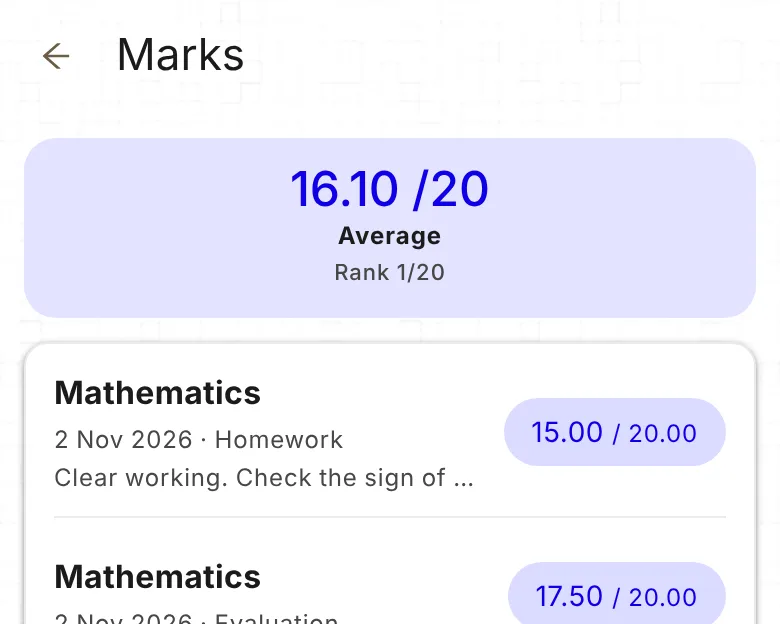 A student’s marks on a phone, with the average and the rank in the class.
4. The report card, ready to print
Section titled “4. The report card, ready to print”On the class page, “Print report cards” prepares every student’s in one PDF; on a student’s page, “Print report card” prepares theirs. The school chooses:
- the period: first term, second term…;
- the subjects and activities that count, for instance only the end-of-term tests;
- the model, “Classic” or “Simple”, then, under “Personalize”, what it shows: the school’s logo, the student’s photo, the rank, the QR code.
The preview shows each page before “Download PDF” or “Print”, and the PDF prints on any printer. Report cards also print from the Windows app, where each step has its own step-by-step guide: schedule an exam, enter marks, print report cards.
What the “Classic” report card carries
Section titled “What the “Classic” report card carries”- at the top, the country, the ministry, the regional directorate and the academy, which the school edits from its organization’s page;
- for each subject: the average, the coefficient, the average multiplied by the coefficient, the rank, the teacher and the appreciation;
- the hours of absence, justified or not, taken from the roll call in class;
- the general average and the rank for each term, then for the year;
- the class average, the highest and the lowest;
- boxes for distinctions and sanctions, the class council’s decision, then the names of the head teacher and the school principal, for signing.
What it costs
Section titled “What it costs”Marks and report cards are part of school management, always included in the price per student per month. The prices are on the home page, and each country’s, in French, on the Côte d’Ivoire, Mali and France pages. To see a report card come out live, ask for a demo.
Questions
Section titled “Questions”Can we print a whole class’s report cards at once?
Section titled “Can we print a whole class’s report cards at once?”Yes. On the class page, “Print report cards” puts the report cards of every enrolled student in one PDF, to download or print. How to print report cards
Can marks be out of 10, out of 100 or letters?
Section titled “Can marks be out of 10, out of 100 or letters?”Yes. Each school has its own grading system: out of 20, out of 10, out of 100 or letters. The report card’s averages, rank and appreciations follow it. How to grade an assignment online
Can the report card follow our school’s model?
Section titled “Can the report card follow our school’s model?”The document header, the logo, the photo, the rank and the QR code are set in the platform. For another layout, “Request another model”, in the report card’s window, opens a form to describe yours to us. How to personalize the report card
Do students see their marks?
Section titled “Do students see their marks?”Yes. Each student sees their marks, average and rank, on a phone and on a computer alike. How to view your marks